
先の記事では全国の医療機関の医療機関コードを取得した.今回は全国の医療機関の診療科を取得し,第一正規形にするところまでを解説する.
今回から生成AIをコーディングの補助として使用することをお断りしておく.
データの取得
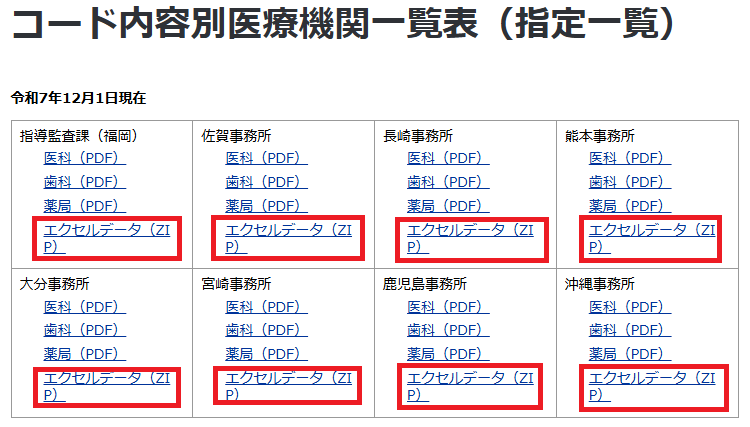
データの取得は地方厚生局から始める.各地方厚生局のサイトの検査欄に「コード内容別医療機関一覧表」と入力して出てきた一番目に該当ページがある.ファイルの置き場所,構造は8つの地方厚生局それぞれによって異なる.下図は九州厚生局のサイトである.エクセルデータをダウンロードする.
Power Queryで地方厚生局ごとにデータを集約する
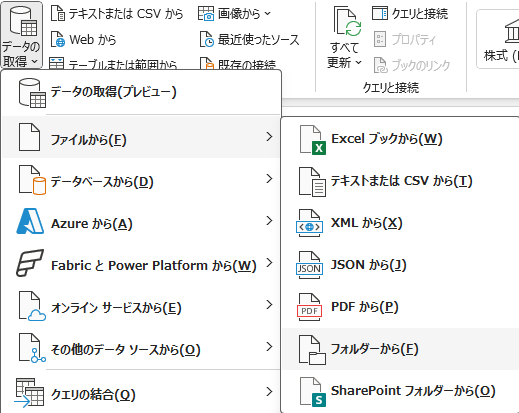
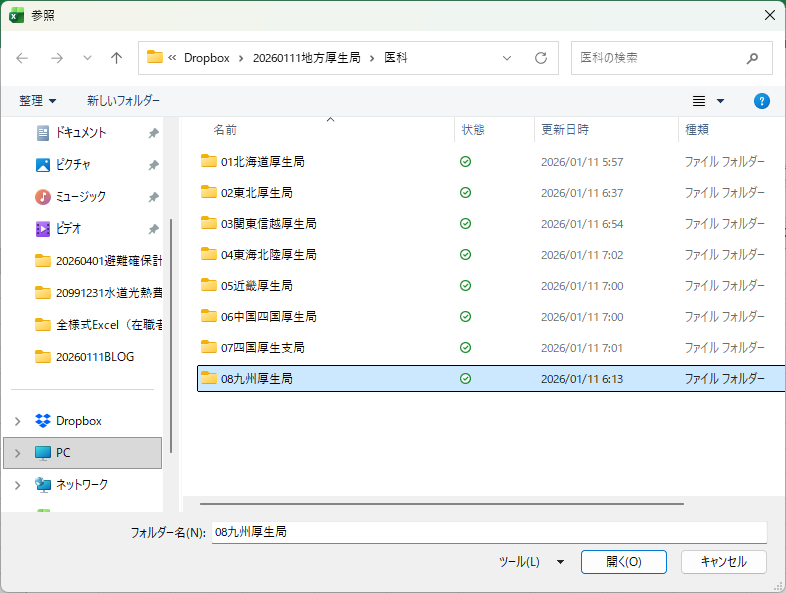
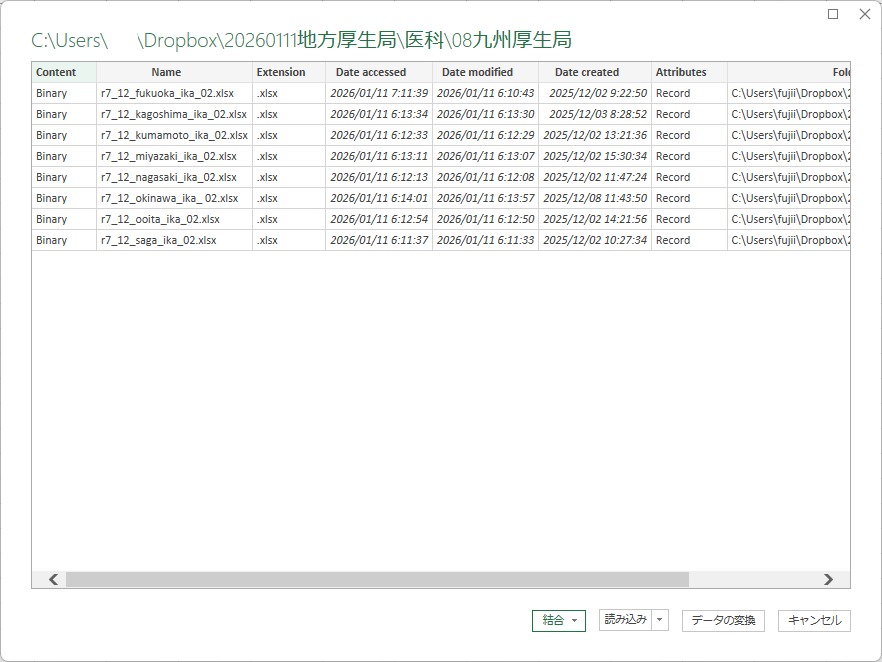
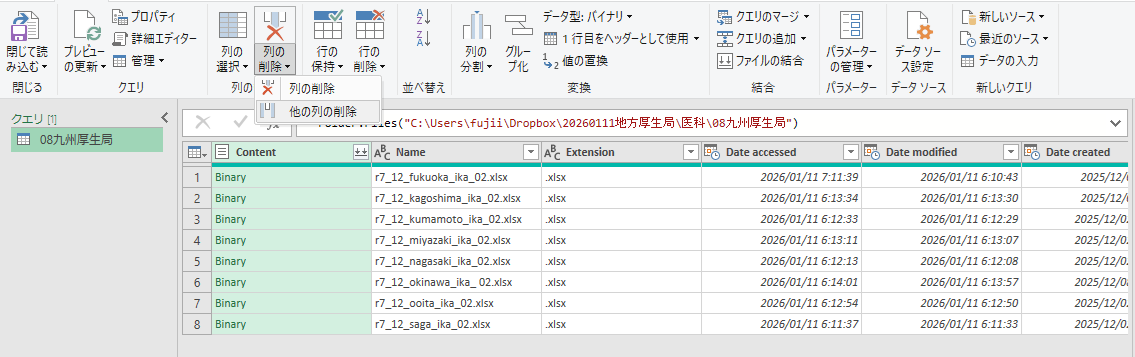
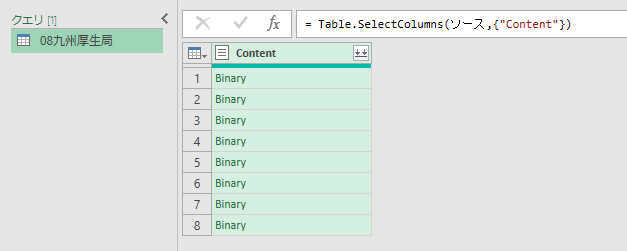
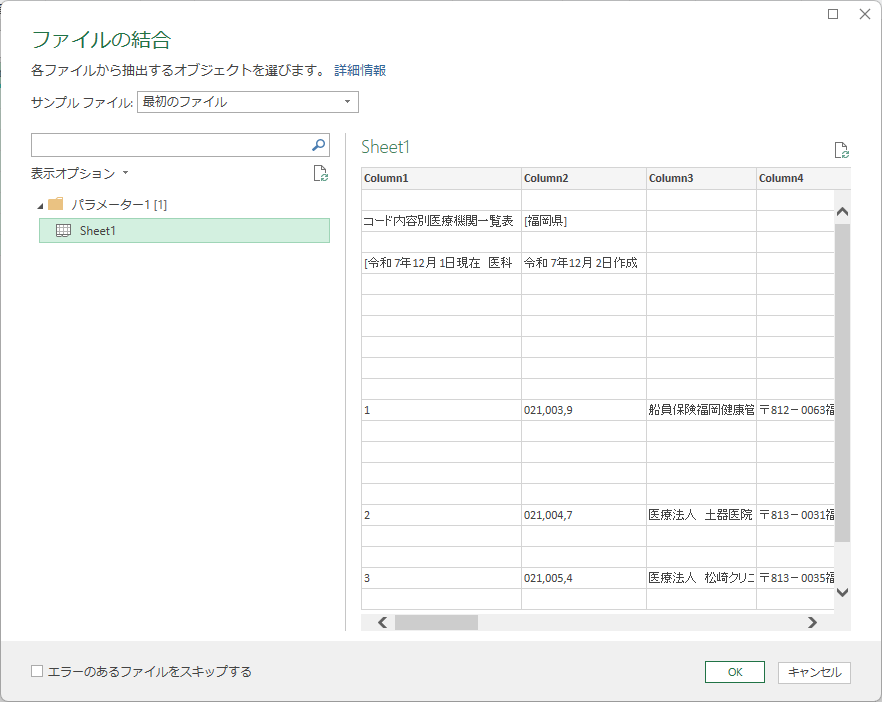
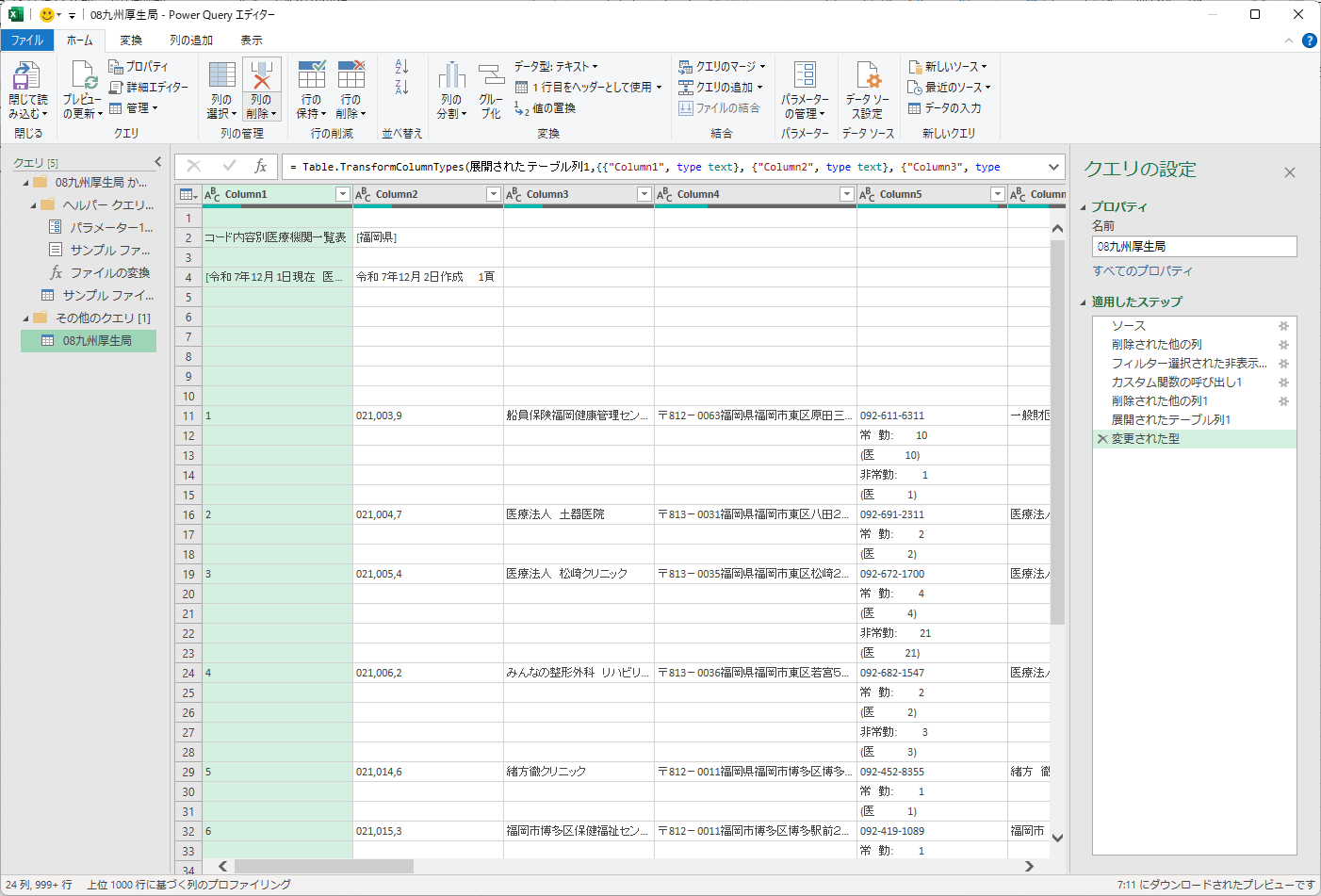
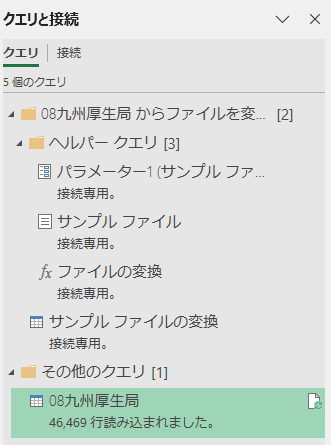
九州の8県のファイルを厚生局ごと,医科と歯科ごとにフォルダに分ける.まとめてPower Queryで処理したくなるが,エラーにより全国一括読み込みは不可能である.地方厚生局ごとに読み込むのがせいぜいである.特に東北厚生局のファイルはブック内に複数のシートが県別に分かれているため,一枚のワークシートにコピペする必要がある.
VBAでの処理
Power Queryで処理したかったが試行錯誤の末,諦めた.この時点で各地方厚生局ごと,医科ごと歯科ごとに一つのブックが出来上がっていることと思う.医科をまとめる用,歯科をまとめる用の新規ブックでVBEを起動して標準モジュールを挿入し,下記コードを実行する.I列にある診療科名を取得するのに苦労した.
Option Explicit

Sub CollectAllDataRecursive()
    ' ========================================
    ' 変数宣言
    ' ========================================
    Dim myFSO       As Object
    Dim myFolder    As Object
    Dim myWsDst     As Worksheet
    Dim myResult()  As Variant
    Dim j           As Long
    Dim myPath      As String
    Dim myMaxRows   As Long
    Dim myStartTime As Double

    ' ========================================
    ' 初期化
    ' ========================================
    myStartTime = Timer

    Set myFSO = CreateObject("Scripting.FileSystemObject")

    ' 最上位フォルダを選択
    With Application.FileDialog(msoFileDialogFolderPicker)
        .Title = "データファイルが格納されている最上位フォルダを選択"
        If .Show = -1 Then
            myPath = .SelectedItems(1)
        Else
            Exit Sub
        End If
    End With

    Set myFolder = myFSO.GetFolder(myPath)
    Set myWsDst = ThisWorkbook.Worksheets("Sheet1")
    myWsDst.Cells.Clear

    ' 結果格納用配列の初期サイズ
    myMaxRows = 500000
    ReDim myResult(1 To myMaxRows, 1 To 10)
    j = 0

    ' ========================================
    ' メイン処理(再帰的探索)
    ' ========================================
    Application.ScreenUpdating = False
    Application.DisplayAlerts = False
    Application.Calculation = xlCalculationManual

    Debug.Print "データ収集開始: " & Now

    Call ProcessFolderRecursive(myFSO, myFolder, myResult, j, myMaxRows)

    Debug.Print "ファイル処理完了: " & j & "行"

    ' ========================================
    ' 結果の一括書き込み
    ' ========================================
    If j > 0 Then
        Debug.Print "シートへの書き込み開始..."
        myWsDst.Range("A1").Resize(j, 10).Value = myResult
        Debug.Print "書き込み完了"
    End If

    Application.Calculation = xlCalculationAutomatic
    Application.ScreenUpdating = True
    Application.DisplayAlerts = True

    MsgBox "データ収集が完了しました。" & vbCrLf & _
           "総行数: " & Format(j, "#,##0") & "行" & vbCrLf & _
           "処理時間: " & Format(Timer - myStartTime, "0.0") & "秒", vbInformation
End Sub


Private Sub ProcessFolderRecursive(ByVal myFSO As Object, _
                                    ByVal myFolder As Object, _
                                    ByRef myResult() As Variant, _
                                    ByRef j As Long, _
                                    ByRef myMaxRows As Long)
    Dim myFile      As Object
    Dim mySubFolder As Object
    Dim myWB        As Workbook
    Dim mySh        As Worksheet
    Dim myRng       As Range
    Dim myVar       As Variant
    Dim i           As Long
    Dim k           As Long

    ' ========================================
    ' 現在のフォルダ内のファイルを処理
    ' ========================================
    For Each myFile In myFolder.Files
        With myFile
            If Right$(.Name, 5) = ".xlsx" Then

                Debug.Print "処理中 (" & j & "行): " & .Name

                On Error Resume Next
                Set myWB = Workbooks.Open(.Path, ReadOnly:=True, UpdateLinks:=False)
                On Error GoTo 0

                If Not myWB Is Nothing Then
                    On Error Resume Next
                    Set mySh = myWB.Worksheets("Sheet1")
                    On Error GoTo 0

                    If Not mySh Is Nothing Then
                        ' A1からのCurrentRegionを取得
                        Set myRng = mySh.Range("A1").CurrentRegion

                        ' A列~J列に制限
                        If myRng.Columns.Count >= 10 Then
                            Set myRng = Intersect(myRng, mySh.Range("A:J"))
                        End If

                        ' データが存在するかチェック
                        If myRng.Rows.Count > 0 Then
                            myVar = myRng.Value

                            ' 1次元配列の場合(1行のみ)の対応
                            If IsArray(myVar) Then
                                If UBound(myVar, 1) = 1 And UBound(myVar, 2) >= 1 Then
                                    ' 1行のみの場合
                                    j = j + 1

                                    If j > myMaxRows Then
                                        myMaxRows = myMaxRows + 100000
                                        ReDim Preserve myResult(1 To myMaxRows, 1 To 10)
                                    End If

                                    For k = 1 To UBound(myVar, 2)
                                        If k <= 10 Then
                                            myResult(j, k) = myVar(1, k)
                                        End If
                                    Next k
                                Else
                                    ' 複数行の場合
                                    For i = LBound(myVar, 1) To UBound(myVar, 1)
                                        j = j + 1

                                        ' 配列サイズを超えたら拡張
                                        If j > myMaxRows Then
                                            myMaxRows = myMaxRows + 100000
                                            ReDim Preserve myResult(1 To myMaxRows, 1 To 10)
                                        End If

                                        ' A列~J列のデータをコピー
                                        For k = LBound(myVar, 2) To UBound(myVar, 2)
                                            If k <= 10 Then
                                                myResult(j, k) = myVar(i, k)
                                            End If
                                        Next k
                                    Next i
                                End If
                            End If
                        End If
                    End If

                    myWB.Close SaveChanges:=False
                    Set myWB = Nothing
                End If
            End If
        End With
    Next myFile

    ' ========================================
    ' サブフォルダを再帰的に処理
    ' ========================================
    For Each mySubFolder In myFolder.SubFolders
        Call ProcessFolderRecursive(myFSO, mySubFolder, myResult, j, myMaxRows)
    Next mySubFolder
End Sub
医科作業用ファイル,歯科作業用ファイルとしてそれぞれ保存する.次に新規ブックを作成し,両者のデータを統合する.下記コードを標準モジュールに記述し実行する.
Sub MergeExistingFiles_Safe()
    ' ========================================
    ' 変数宣言
    ' ========================================
    Dim myWB1       As Workbook
    Dim myWB2       As Workbook
    Dim mySh1       As Worksheet
    Dim mySh2       As Worksheet
    Dim myWsDst     As Worksheet
    Dim myRng1      As Range
    Dim myRng2      As Range
    Dim myPath1     As Variant
    Dim myPath2     As Variant
    Dim myStartTime As Double
    Dim myLastRow1  As Long
    Dim myLastRow2  As Long

    ' ========================================
    ' 初期化
    ' ========================================
    myStartTime = Timer

    myPath1 = Application.GetOpenFilename("Excel Files, *.xls?", , "医科データファイルを選択")
    If myPath1 = False Then Exit Sub

    myPath2 = Application.GetOpenFilename("Excel Files, *.xls?", , "歯科データファイルを選択")
    If myPath2 = False Then Exit Sub

    Set myWsDst = ThisWorkbook.Worksheets("Sheet1")
    myWsDst.Cells.Clear

    Application.ScreenUpdating = False
    Application.DisplayAlerts = False
    Application.Calculation = xlCalculationManual

    ' ========================================
    ' 1つ目のファイルを処理(医科)
    ' ========================================
    Debug.Print "医科データ読み込み中..."

    Set myWB1 = Workbooks.Open(myPath1, ReadOnly:=True, UpdateLinks:=False)
    Set mySh1 = myWB1.Worksheets("Sheet1")

    ' 最終行を取得
    myLastRow1 = mySh1.Cells(mySh1.Rows.Count, "A").End(xlUp).Row

    If myLastRow1 > 0 Then
        ' A列~J列の全データを取得
        Set myRng1 = mySh1.Range("A1:J" & myLastRow1)

        Debug.Print "医科データ: " & Format(myLastRow1, "#,##0") & "行"
        Debug.Print "範囲: " & myRng1.Address

        ' 直接コピー
        myRng1.Copy Destination:=myWsDst.Range("A1")
    End If

    myWB1.Close SaveChanges:=False
    Set myWB1 = Nothing

    ' ========================================
    ' 2つ目のファイルを処理(歯科)
    ' ========================================
    Debug.Print "歯科データ読み込み中..."

    Set myWB2 = Workbooks.Open(myPath2, ReadOnly:=True, UpdateLinks:=False)
    Set mySh2 = myWB2.Worksheets("Sheet1")

    ' 最終行を取得
    myLastRow2 = mySh2.Cells(mySh2.Rows.Count, "A").End(xlUp).Row

    If myLastRow2 > 0 Then
        ' A列~J列の全データを取得
        Set myRng2 = mySh2.Range("A1:J" & myLastRow2)

        Debug.Print "歯科データ: " & Format(myLastRow2, "#,##0") & "行"
        Debug.Print "範囲: " & myRng2.Address

        ' 医科データの下に追加
        myRng2.Copy Destination:=myWsDst.Range("A" & (myLastRow1 + 1))
    End If

    myWB2.Close SaveChanges:=False
    Set myWB2 = Nothing

    Application.Calculation = xlCalculationAutomatic
    Application.ScreenUpdating = True
    Application.DisplayAlerts = True

    Debug.Print "完了"

    MsgBox "データ統合が完了しました。" & vbCrLf & _
           "医科: " & Format(myLastRow1, "#,##0") & "行" & vbCrLf & _
           "歯科: " & Format(myLastRow2, "#,##0") & "行" & vbCrLf & _
           "合計: " & Format(myLastRow1 + myLastRow2, "#,##0") & "行" & vbCrLf & _
           "処理時間: " & Format(Timer - myStartTime, "0.0") & "秒", vbInformation
End Sub
この時点でまだ第一正規形にはなっておらず,単に全データを一枚のワークシートにコピペしただけである.ここから医療機関番号,医療機関名,診療科名のリスト,郵便番号,住所を取り出す.A列の連番が前の医療機関と次の医療機関の境界となっている.I列に診療科名のリストがあるが,取得すべきでない文字列もI列にあり,それらを弾く仕組みの構築に苦労した.結果的にI列の最終行にあるセルが診療科名のリストであるという構造を適用した結果取得に成功した.
Sub ExtractDepartments_Redesign()
    ' ========================================
    ' 変数宣言
    ' ========================================
    Dim myWsSrc     As Worksheet
    Dim myWsDst     As Worksheet
    Dim myLastRow   As Long
    Dim i           As Long
    Dim myStartRow  As Long
    Dim myNextStart As Long
    Dim myOutRow    As Long
    Dim myCode      As String
    Dim myName      As String
    Dim myRawAddr   As String
    Dim myZip7      As String
    Dim myAddr      As String
    Dim myDept      As String

    ' ========================================
    ' ワークシートオブジェクトの取得
    ' ========================================
    Set myWsSrc = ThisWorkbook.Sheets("Sheet1")

    On Error Resume Next
    Set myWsDst = ThisWorkbook.Sheets("Sheet2")
    On Error GoTo 0

    If myWsDst Is Nothing Then
        Set myWsDst = Worksheets.Add(After:=myWsSrc)
        myWsDst.Name = "Sheet2"
    Else
        myWsDst.Cells.Clear
    End If

    ' ========================================
    ' ヘッダー行の設定
    ' ========================================
    With myWsDst
        .Cells(1, 1).Value = "医療機関番号"
        .Cells(1, 2).Value = "医療機関名"
        .Cells(1, 3).Value = "診療科名"
        .Cells(1, 4).Value = "M_ZIPCODE"
        .Cells(1, 5).Value = "住所"
    End With

    ' ========================================
    ' メイン処理
    ' ========================================
    myLastRow = myWsSrc.Cells(myWsSrc.Rows.Count, "A").End(xlUp).Row
    myOutRow = 2
    i = 1

    Do While i <= myLastRow
        If IsMedicalStartRow(myWsSrc, i) Then
            myStartRow = i
            myNextStart = FindNextStart(myWsSrc, i + 1, myLastRow)

            If myNextStart = 0 Then
                myNextStart = myLastRow + 1
            End If

            ' データの取得
            With myWsSrc
                myCode = Trim(.Cells(myStartRow, 2).Value & "")
                myName = Trim(.Cells(myStartRow, 3).Value & "")
                myRawAddr = Trim(.Cells(myStartRow, 4).Value & "")
            End With

            Call ExtractZipAndAddress(myRawAddr, myZip7, myAddr)
            myDept = FindDeptFromBottom(myWsSrc, myStartRow, myNextStart - 1)

            ' データの出力
            With myWsDst
                .Cells(myOutRow, 1).Value = myCode
                .Cells(myOutRow, 2).Value = myName
                .Cells(myOutRow, 3).Value = myDept
                .Cells(myOutRow, 4).NumberFormat = "@"
                .Cells(myOutRow, 4).Value = myZip7
                .Cells(myOutRow, 5).Value = myAddr
            End With

            myOutRow = myOutRow + 1
            i = myNextStart
        Else
            i = i + 1
        End If
    Loop

    MsgBox "診療科+郵便番号+住所の抽出が完了しました(Sheet2)"
End Sub


Private Function FindNextStart(ByVal myWs As Worksheet, _
                                ByVal myStartRow As Long, _
                                ByVal myLastRow As Long) As Long
    Dim i As Long

    For i = myStartRow To myLastRow
        If IsMedicalStartRow(myWs, i) Then
            FindNextStart = i
            Exit Function
        End If
    Next i

    FindNextStart = 0
End Function


Private Function FindDeptFromBottom(ByVal myWs As Worksheet, _
                                     ByVal myStartRow As Long, _
                                     ByVal myEndRow As Long) As String
    Dim i       As Long
    Dim myCand  As String

    For i = myEndRow To myStartRow Step -1
        myCand = Trim(myWs.Cells(i, 9).Value & "")

        If myCand <> "" Then
            If Not IsNoiseDept2(myCand) Then
                FindDeptFromBottom = myCand
                Exit Function
            End If
        End If
    Next i

    FindDeptFromBottom = ""
End Function


Private Function IsMedicalStartRow(ByVal myWs As Worksheet, _
                                    ByVal myRow As Long) As Boolean
    Dim myA As String
    Dim myC As String

    myA = myWs.Cells(myRow, 1).Value & ""
    myC = Trim(myWs.Cells(myRow, 3).Value & "")

    If myC = "" Then
        IsMedicalStartRow = False
        Exit Function
    End If

    myA = Replace(myA, " ", " ")
    myA = Trim(myA)
    myA = ZenkakuToHankaku(myA)

    If Left$(myA, 1) = "(" Then
        IsMedicalStartRow = False
        Exit Function
    End If

    If myA <> "" And IsNumeric(myA) Then
        IsMedicalStartRow = True
    Else
        IsMedicalStartRow = False
    End If
End Function


Private Function IsNoiseDept2(ByVal myTxt As String) As Boolean
    Dim myT     As String
    Dim myRest  As String
    Dim myInner As String
    Dim myKeys  As Variant
    Dim myKey   As Variant

    myT = Trim(Replace(myTxt, " ", " "))

    If IsNumeric(myT) Then
        IsNoiseDept2 = True
        Exit Function
    End If

    If Left$(myT, 1) = "(" And Right$(myT, 1) = ")" Then
        myInner = Mid$(myT, 2, Len(myT) - 2)
        myInner = ZenkakuToHankaku(myInner)

        If IsNumeric(myInner) Then
            IsNoiseDept2 = True
            Exit Function
        End If
    End If

    If myT = "一般" Or myT = "療養" Then
        IsNoiseDept2 = True
        Exit Function
    End If

    If Left$(myT, 2) = "一般" And InStr(myT, "(") > 0 Then
        IsNoiseDept2 = True
        Exit Function
    End If

    myKeys = Array("一般", "精神", "感染", "介護", "療養")
    For Each myKey In myKeys
        If Left$(myT, Len(myKey)) = myKey Then
            myRest = Trim(Mid$(myT, Len(myKey) + 1))
            myRest = ZenkakuToHankaku(myRest)

            If myRest <> "" And IsNumeric(myRest) Then
                IsNoiseDept2 = True
                Exit Function
            End If
        End If
    Next myKey

    If Left$(myT, 2) = "その他" Then
        IsNoiseDept2 = True
        Exit Function
    End If

    IsNoiseDept2 = False
End Function


Private Function ZenkakuToHankaku(ByVal myTxt As String) As String
    Dim i           As Long
    Dim myCh        As String
    Dim myCode      As Long
    Dim myResult    As String

    myResult = ""

    For i = 1 To Len(myTxt)
        myCh = Mid$(myTxt, i, 1)
        myCode = AscW(myCh)

        If myCode >= &HFF10 And myCode <= &HFF19 Then
            myResult = myResult & ChrW(myCode - &HFF10 + AscW("0"))
        Else
            myResult = myResult & myCh
        End If
    Next i

    ZenkakuToHankaku = myResult
End Function


Private Sub ExtractZipAndAddress(ByVal myRaw As String, _
                                  ByRef myZip7 As String, _
                                  ByRef myAddr As String)
    Dim myP         As Long
    Dim i           As Long
    Dim myCh        As String
    Dim myZipPart   As String

    myZip7 = ""
    myAddr = myRaw

    myP = InStr(myRaw, "〒")
    If myP = 0 Then Exit Sub

    myZipPart = ""
    For i = myP + 1 To Len(myRaw)
        myCh = Mid$(myRaw, i, 1)

        If (myCh >= "0" And myCh <= "9") _
            Or (AscW(myCh) >= &HFF10 And AscW(myCh) <= &HFF19) _
            Or myCh = "-" _
            Or myCh = "‐" _
            Or myCh = "-" _
            Or myCh = "―" Then
            myZipPart = myZipPart & myCh
        Else
            Exit For
        End If
    Next i

    If myZipPart = "" Then Exit Sub

    myZipPart = ZenkakuToHankaku(myZipPart)
    myZipPart = Replace(myZipPart, "‐", "-")
    myZipPart = Replace(myZipPart, "-", "-")
    myZipPart = Replace(myZipPart, "―", "-")

    myZip7 = Replace(myZipPart, "-", "")

    myAddr = ""
    If i <= Len(myRaw) Then
        myAddr = Trim(Mid$(myRaw, i))
    End If
End Sub
その結果第一正規形の手前の状態となる.全角スペースが区切り文字となった配列型とみなせなくもない.その他にも丸括弧の中が配列型で区切り文字が全角カンマとなっているもの,単に全角カンマが区切り文字となっているものなどがある.全角中黒は区切り文字ではなく,おそらく一人の医師が複数可を標榜しているものと思われるため,そのままとしておく.
以上の処理を順次実行する.取り出すデータは医療機関番号,医療機関名,診療科名,郵便番号,住所である.
' ========================================
' ドライバー: すべての処理を順番に実行
' ========================================
Sub ExecuteAllNormalization()
    Dim myStartTime As Double
    Dim myMsg       As String

    myStartTime = Timer

    ' 実行確認
    myMsg = "以下の処理を順番に実行します:" & vbCrLf & vbCrLf & _
            "① 全角スペースで分割(normalized シート)" & vbCrLf & _
            "② 括弧内の展開(Sheet2)" & vbCrLf & _
            "③ 読点区切りの展開(Sheet3)" & vbCrLf & _
            "④ 丸付き数字での展開(Sheet4)" & vbCrLf & _
            "⑤ カンマ区切りの展開(Sheet5)" & vbCrLf & vbCrLf & _
            "実行しますか?"

    If MsgBox(myMsg, vbYesNo + vbQuestion, "診療科正規化処理") = vbNo Then
        Exit Sub
    End If

    Application.ScreenUpdating = False
    Application.DisplayAlerts = False
    Application.Calculation = xlCalculationManual

    Debug.Print "========================================="
    Debug.Print "診療科正規化処理開始: " & Now
    Debug.Print "========================================="

    ' ① 全角スペースで分割
    Debug.Print "① 全角スペースで分割処理中..."
    Call NormalizeDepartments
    Debug.Print "   完了"

    ' ② 括弧内の展開
    Debug.Print "② 括弧内の展開処理中..."
    Call ExpandDepartments
    Debug.Print "   完了"

    ' ③ 読点区切りの展開
    Debug.Print "③ 読点区切りの展開処理中..."
    Call SplitByComma
    Debug.Print "   完了"

    ' ④ 丸付き数字での展開
    Debug.Print "④ 丸付き数字での展開処理中..."
    Call SplitByCircledNumbers
    Debug.Print "   完了"

    ' ⑤ カンマ区切りの展開
    Debug.Print "⑤ カンマ区切りの展開処理中..."
    Call SplitByCommaOnly
    Debug.Print "   完了"

    Application.Calculation = xlCalculationAutomatic
    Application.ScreenUpdating = True
    Application.DisplayAlerts = True

    Debug.Print "========================================="
    Debug.Print "すべての処理が完了しました"
    Debug.Print "処理時間: " & Format(Timer - myStartTime, "0.0") & "秒"
    Debug.Print "========================================="

    MsgBox "すべての診療科正規化処理が完了しました。" & vbCrLf & vbCrLf & _
           "最終結果: Sheet6" & vbCrLf & _
           "処理時間: " & Format(Timer - myStartTime, "0.0") & "秒", _
           vbInformation, "処理完了"
End Sub


' ========================================
' ① NormalizeDepartments
' ========================================
Sub NormalizeDepartments()
    ' ========================================
    ' 変数宣言
    ' ========================================
    Dim myWsSrc     As Worksheet
    Dim myWsDst     As Worksheet
    Dim myLastRow   As Long
    Dim myOutRow    As Long
    Dim i           As Long
    Dim myRaw       As String
    Dim myParts     As Variant
    Dim myP         As Variant
    Dim myNorm      As String

    ' ========================================
    ' ワークシートオブジェクトの取得
    ' ========================================
    Set myWsSrc = ThisWorkbook.Sheets("Sheet2")

    On Error Resume Next
    Set myWsDst = ThisWorkbook.Sheets("normalized")
    On Error GoTo 0

    If myWsDst Is Nothing Then
        Set myWsDst = Worksheets.Add(After:=myWsSrc)
        myWsDst.Name = "normalized"
    Else
        myWsDst.Cells.Clear
    End If

    ' ========================================
    ' ヘッダー行の設定
    ' ========================================
    With myWsDst
        .Cells(1, 1).Value = "医療機関番号"
        .Cells(1, 2).Value = "医療機関名"
        .Cells(1, 3).Value = "診療科"
        .Cells(1, 4).Value = "郵便番号"
        .Cells(1, 5).Value = "住所"
    End With

    ' ========================================
    ' メイン処理
    ' ========================================
    myLastRow = myWsSrc.Cells(myWsSrc.Rows.Count, "A").End(xlUp).Row
    myOutRow = 2

    For i = 2 To myLastRow
        myRaw = Trim(myWsSrc.Cells(i, 3).Value & "")

        If myRaw <> "" Then
            myParts = Split(myRaw, " ")

            For Each myP In myParts
                myP = Trim(myP & "")

                If myP <> "" Then
                    myNorm = NormalizeDeptName(myP)

                    With myWsDst
                        .Cells(myOutRow, 1).Value = myWsSrc.Cells(i, 1).Value
                        .Cells(myOutRow, 2).Value = myWsSrc.Cells(i, 2).Value
                        .Cells(myOutRow, 3).Value = myNorm
                        .Cells(myOutRow, 4).Value = myWsSrc.Cells(i, 4).Value
                        .Cells(myOutRow, 5).Value = myWsSrc.Cells(i, 5).Value
                    End With

                    myOutRow = myOutRow + 1
                End If
            Next myP
        End If
    Next i
End Sub


Private Function NormalizeDeptName(ByVal myS As String) As String
    NormalizeDeptName = Trim(myS)
End Function


' ========================================
' ② ExpandDepartments
' ========================================
Sub ExpandDepartments()
    ' ========================================
    ' 変数宣言
    ' ========================================
    Dim myWsSrc     As Worksheet
    Dim myWsDst     As Worksheet
    Dim myLastRow   As Long
    Dim myOutRow    As Long
    Dim i           As Long
    Dim myRaw       As String
    Dim myExpanded  As Variant
    Dim myE         As Variant

    ' ========================================
    ' ワークシートオブジェクトの取得
    ' ========================================
    Set myWsSrc = ThisWorkbook.Sheets("normalized")

    On Error Resume Next
    Set myWsDst = ThisWorkbook.Sheets("Sheet3")
    On Error GoTo 0

    If myWsDst Is Nothing Then
        Set myWsDst = Worksheets.Add(After:=myWsSrc)
        myWsDst.Name = "Sheet3"
    Else
        myWsDst.Cells.Clear
    End If

    ' ========================================
    ' ヘッダー行の設定
    ' ========================================
    With myWsDst
        .Cells(1, 1).Value = "医療機関番号"
        .Cells(1, 2).Value = "医療機関名"
        .Cells(1, 3).Value = "診療科"
        .Cells(1, 4).Value = "郵便番号"
        .Cells(1, 5).Value = "住所"
    End With

    ' ========================================
    ' メイン処理
    ' ========================================
    myLastRow = myWsSrc.Cells(myWsSrc.Rows.Count, "A").End(xlUp).Row
    myOutRow = 2

    For i = 2 To myLastRow
        myRaw = Trim(myWsSrc.Cells(i, 3).Value & "")

        If myRaw <> "" Then
            myExpanded = ExpandDept(myRaw)

            For Each myE In myExpanded
                With myWsDst
                    .Cells(myOutRow, 1).Value = myWsSrc.Cells(i, 1).Value
                    .Cells(myOutRow, 2).Value = myWsSrc.Cells(i, 2).Value
                    .Cells(myOutRow, 3).Value = myE
                    .Cells(myOutRow, 4).Value = myWsSrc.Cells(i, 4).Value
                    .Cells(myOutRow, 5).Value = myWsSrc.Cells(i, 5).Value
                End With

                myOutRow = myOutRow + 1
            Next myE
        End If
    Next i
End Sub


Private Function ExpandDept(ByVal myS As String) As Variant
    Dim myResult()  As String
    Dim myInner     As String
    Dim myOuter     As String
    Dim myP1        As Long
    Dim myP2        As Long
    Dim myParts     As Variant
    Dim i           As Long
    Dim myHasComma  As Boolean

    myP1 = InStr(myS, "(")
    myP2 = InStr(myS, ")")

    If myP1 = 0 Or myP2 = 0 Or myP2 < myP1 Then
        myP1 = InStr(myS, "(")
        myP2 = InStr(myS, ")")
    End If

    If myP1 = 0 Or myP2 = 0 Or myP2 < myP1 Then
        ReDim myResult(0)
        myResult(0) = myS
        ExpandDept = myResult
        Exit Function
    End If

    myInner = Mid$(myS, myP1 + 1, myP2 - myP1 - 1)
    myOuter = Trim(Mid$(myS, myP2 + 1))

    If myOuter = "" Then
        ReDim myResult(0)
        myResult(0) = myS
        ExpandDept = myResult
        Exit Function
    End If

    myHasComma = (InStr(myInner, "、") > 0) Or (InStr(myInner, ",") > 0)

    If myHasComma Then
        If InStr(myInner, "、") > 0 Then
            myParts = Split(myInner, "、")
        Else
            myParts = Split(myInner, ",")
        End If

        ReDim myResult(UBound(myParts))

        For i = 0 To UBound(myParts)
            myResult(i) = Trim(myParts(i)) & myOuter
        Next i
    Else
        ReDim myResult(0)
        myResult(0) = myS
    End If

    ExpandDept = myResult
End Function


' ========================================
' ③ SplitByComma
' ========================================
Sub SplitByComma()
    ' ========================================
    ' 変数宣言
    ' ========================================
    Dim myWsSrc     As Worksheet
    Dim myWsDst     As Worksheet
    Dim myLastRow   As Long
    Dim myOutRow    As Long
    Dim i           As Long
    Dim myRaw       As String
    Dim myParts     As Variant
    Dim myP         As Variant

    ' ========================================
    ' ワークシートオブジェクトの取得
    ' ========================================
    Set myWsSrc = ThisWorkbook.Sheets("Sheet3")

    On Error Resume Next
    Set myWsDst = ThisWorkbook.Sheets("Sheet4")
    On Error GoTo 0

    If myWsDst Is Nothing Then
        Set myWsDst = Worksheets.Add(After:=myWsSrc)
        myWsDst.Name = "Sheet4"
    Else
        myWsDst.Cells.Clear
    End If

    ' ========================================
    ' ヘッダー行の設定
    ' ========================================
    With myWsDst
        .Cells(1, 1).Value = "医療機関番号"
        .Cells(1, 2).Value = "医療機関名"
        .Cells(1, 3).Value = "診療科"
        .Cells(1, 4).Value = "郵便番号"
        .Cells(1, 5).Value = "住所"
    End With

    ' ========================================
    ' メイン処理
    ' ========================================
    myLastRow = myWsSrc.Cells(myWsSrc.Rows.Count, "A").End(xlUp).Row
    myOutRow = 2

    For i = 2 To myLastRow
        myRaw = Trim(myWsSrc.Cells(i, 3).Value & "")

        If myRaw <> "" Then
            If InStr(myRaw, "、") > 0 Then
                myParts = Split(myRaw, "、")
            Else
                ReDim myParts(0)
                myParts(0) = myRaw
            End If

            For Each myP In myParts
                myP = Trim(myP & "")

                If myP <> "" Then
                    With myWsDst
                        .Cells(myOutRow, 1).Value = myWsSrc.Cells(i, 1).Value
                        .Cells(myOutRow, 2).Value = myWsSrc.Cells(i, 2).Value
                        .Cells(myOutRow, 3).Value = myP
                        .Cells(myOutRow, 4).Value = myWsSrc.Cells(i, 4).Value
                        .Cells(myOutRow, 5).Value = myWsSrc.Cells(i, 5).Value
                    End With

                    myOutRow = myOutRow + 1
                End If
            Next myP
        End If
    Next i
End Sub


' ========================================
' ④ SplitByCircledNumbers
' ========================================
Sub SplitByCircledNumbers()
    ' ========================================
    ' 変数宣言
    ' ========================================
    Dim myWsSrc     As Worksheet
    Dim myWsDst     As Worksheet
    Dim myLastRow   As Long
    Dim myOutRow    As Long
    Dim i           As Long
    Dim myRaw       As String
    Dim myParts     As Variant
    Dim myP         As Variant

    ' ========================================
    ' ワークシートオブジェクトの取得
    ' ========================================
    Set myWsSrc = ThisWorkbook.Sheets("Sheet4")

    On Error Resume Next
    Set myWsDst = ThisWorkbook.Sheets("Sheet5")
    On Error GoTo 0

    If myWsDst Is Nothing Then
        Set myWsDst = Worksheets.Add(After:=myWsSrc)
        myWsDst.Name = "Sheet5"
    Else
        myWsDst.Cells.Clear
    End If

    ' ========================================
    ' ヘッダー行の設定
    ' ========================================
    With myWsDst
        .Cells(1, 1).Value = "医療機関番号"
        .Cells(1, 2).Value = "医療機関名"
        .Cells(1, 3).Value = "診療科"
        .Cells(1, 4).Value = "郵便番号"
        .Cells(1, 5).Value = "住所"
    End With

    ' ========================================
    ' メイン処理
    ' ========================================
    myLastRow = myWsSrc.Cells(myWsSrc.Rows.Count, "A").End(xlUp).Row
    myOutRow = 2

    For i = 2 To myLastRow
        myRaw = Trim(myWsSrc.Cells(i, 3).Value & "")

        If myRaw <> "" Then
            myParts = SplitCircled(myRaw)

            For Each myP In myParts
                myP = Trim(myP & "")

                If myP <> "" Then
                    With myWsDst
                        .Cells(myOutRow, 1).Value = myWsSrc.Cells(i, 1).Value
                        .Cells(myOutRow, 2).Value = myWsSrc.Cells(i, 2).Value
                        .Cells(myOutRow, 3).Value = myP
                        .Cells(myOutRow, 4).Value = myWsSrc.Cells(i, 4).Value
                        .Cells(myOutRow, 5).Value = myWsSrc.Cells(i, 5).Value
                    End With

                    myOutRow = myOutRow + 1
                End If
            Next myP
        End If
    Next i
End Sub


Private Function SplitCircled(ByVal myS As String) As Variant
    Dim myResult()  As String
    Dim myBuf       As String
    Dim i           As Long
    Dim myCh        As String
    Dim myCount     As Long

    ReDim myResult(0)
    myBuf = ""
    myCount = 0

    For i = 1 To Len(myS)
        myCh = Mid$(myS, i, 1)

        If AscW(myCh) >= &H2460 And AscW(myCh) <= &H2473 Then
            If Trim(myBuf) <> "" Then
                myResult(myCount) = Trim(myBuf)
                myCount = myCount + 1
                ReDim Preserve myResult(myCount)
            End If

            myBuf = ""
        Else
            myBuf = myBuf & myCh
        End If
    Next i

    If Trim(myBuf) <> "" Then
        myResult(myCount) = Trim(myBuf)
    Else
        If myCount = 0 Then
            myResult(0) = myS
        End If
    End If

    SplitCircled = myResult
End Function


' ========================================
' ⑤ SplitByCommaOnly
' ========================================
Sub SplitByCommaOnly()
    ' ========================================
    ' 変数宣言
    ' ========================================
    Dim myWsSrc     As Worksheet
    Dim myWsDst     As Worksheet
    Dim myLastRow   As Long
    Dim myOutRow    As Long
    Dim i           As Long
    Dim myRaw       As String
    Dim myParts     As Variant
    Dim myP         As Variant

    ' ========================================
    ' ワークシートオブジェクトの取得
    ' ========================================
    Set myWsSrc = ThisWorkbook.Sheets("Sheet5")

    On Error Resume Next
    Set myWsDst = ThisWorkbook.Sheets("Sheet6")
    On Error GoTo 0

    If myWsDst Is Nothing Then
        Set myWsDst = Worksheets.Add(After:=myWsSrc)
        myWsDst.Name = "Sheet6"
    Else
        myWsDst.Cells.Clear
    End If

    ' ========================================
    ' ヘッダー行の設定
    ' ========================================
    With myWsDst
        .Cells(1, 1).Value = "医療機関番号"
        .Cells(1, 2).Value = "医療機関名"
        .Cells(1, 3).Value = "診療科"
        .Cells(1, 4).Value = "郵便番号"
        .Cells(1, 5).Value = "住所"
    End With

    ' ========================================
    ' メイン処理
    ' ========================================
    myLastRow = myWsSrc.Cells(myWsSrc.Rows.Count, "A").End(xlUp).Row
    myOutRow = 2

    For i = 2 To myLastRow
        myRaw = Trim(myWsSrc.Cells(i, 3).Value & "")

        If myRaw <> "" Then
            myRaw = Replace(myRaw, ",", "、")
            myRaw = Replace(myRaw, ",", "、")

            If InStr(myRaw, "、") > 0 Then
                myParts = Split(myRaw, "、")
            Else
                ReDim myParts(0)
                myParts(0) = myRaw
            End If

            For Each myP In myParts
                myP = Trim(myP & "")

                If myP <> "" Then
                    With myWsDst
                        .Cells(myOutRow, 1).Value = myWsSrc.Cells(i, 1).Value
                        .Cells(myOutRow, 2).Value = myWsSrc.Cells(i, 2).Value
                        .Cells(myOutRow, 3).Value = myP
                        .Cells(myOutRow, 4).Value = myWsSrc.Cells(i, 4).Value
                        .Cells(myOutRow, 5).Value = myWsSrc.Cells(i, 5).Value
                    End With

                    myOutRow = myOutRow + 1
                End If
            Next myP
        End If
    Next i
End Sub
以上の処理により第一正規形となった.
まとめ
全国の地方厚生局のサイトにある各医療機関の診療科名を取得し,第一正規形にした.Power Queryだけでは対応しきれず,VBAによる処理が必要であった.最終的な件数は484,435行であった.医療機関数は156,045行であった.データは2026年1月時点のものである.
生成AIをコーディングに使用した.入力と出力を1対1で対応させ,1ステップずつ処理を行わせることで目的を達した.